Your AI’s memory, set up for you.

One memory for you, your team and every AI you use.

One place for the notes that explain your work and life (projects, people, decisions, how you like things done) that ChatGPT, Claude and Cursor can all read. Answer a few questions and your AI sets it up for you.

Start your free trial Read the guide

14-day free trial. No card needed to start.

Same AI. Same request. One of them knows you.

Stop re-explaining your job to AI. Turn on your vault and watch the answer change. Every highlight traces back to the note it came from.

You ask “Write a follow-up to Dana about the proposal.”

Generic answer

Same AI, same request. Switch to “With your vault” to see what changes.

Works with the AI you already use

  • Claude
  • ChatGPT
  • Claude Code
  • Cursor
  • Any MCP app

The vault

Not a hidden store. Notes you can open, read and edit.

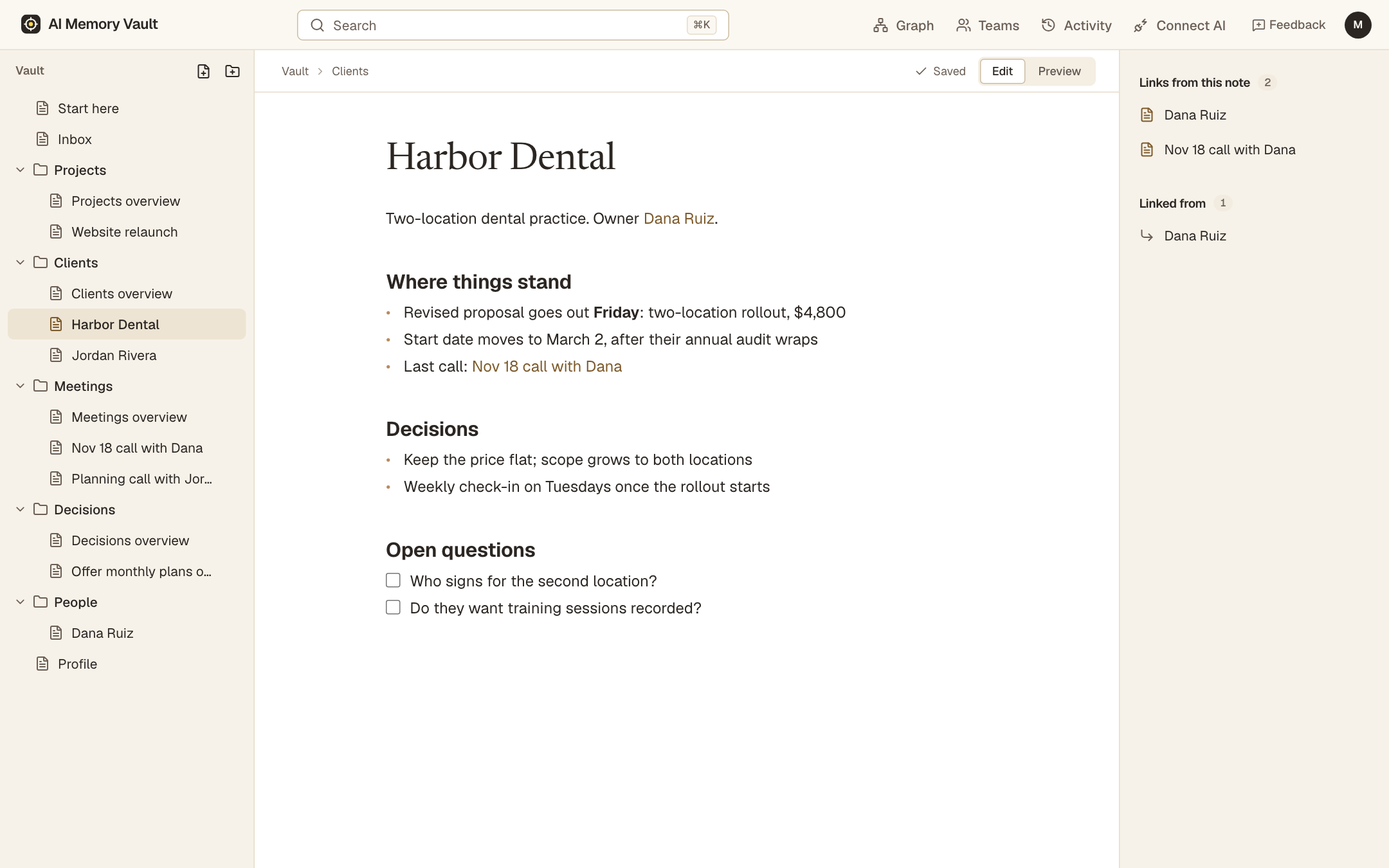
Behind the connection is a fast Markdown notes app with folders, [[wiki links]], backlinks, search and a graph view. It saves as you type, and it works on its own, with or without AI.

The AI Memory Vault workspace: folders and notes on the left, a client note for Harbor Dental open in the middle, and the notes it links to on the right.
The app itself: folders your AI files into on the left, a client note in the middle, and the notes it links to on the right.

Setup

No blank page. No weekend of setup.

Tell it what you use it for and it builds a vault shaped for that, with example notes and a Start here page your AI reads first.

  1. Tell it what you do

    Answer a few questions about your work and what you want kept straight. It takes about two minutes.

  2. Get a vault that’s already organized

    Linked Markdown notes for your projects, people, meetings, decisions and goals, plus a Start here note your AI reads first.

  3. Connect your AI

    Paste one address into Claude, ChatGPT, Claude Code or Cursor and approve it. From then on it reads what matters and saves what it learns.

Six starting points. Client work, running a business, software, study, writing and personal life. Pick one to start. You can add more later.

Not technical? Connect your AI and choose Set up my vault. It asks you a few questions and files the answers for you. The guide walks through each step.

The playbook

It saves what matters, so you don’t have to ask.

Every AI you connect follows the same built-in playbook. You can read exactly what it’s told on the Connect page.

Saves what will matter later
People, clients, projects, decisions and commitments, filed as they come up.
One fact, one place
It adds to the note that already exists instead of starting a new one.
Links related notes
A client links to its projects, and a decision to the meeting it came from.
Asks before it cleans up
It points out duplicates and stale notes, and changes nothing until you say yes.

Ready-made commands

Picked from the menu in your AI app

Set up my vault
A short interview that fills your vault with what your AI should know.
Save this conversation
Files what’s worth remembering from this chat.
Tidy my vault
Finds clutter and suggests fixes. Changes nothing until you choose.
Catch me up
A briefing on one client, project or person, from your notes.

Team vaults

One set of ground rules for every AI on the team.

A team vault holds how your team works: policies, standards, who owns what, the glossary and past decisions. Every member’s AI reads it alongside that person’s private vault, so nobody pastes the rules into a chat again.

  1. Anyone suggests a change

    A member, or their AI, suggests an edit to the team vault. Nothing changes yet.

  2. A maintainer decides

    Owners and maintainers accept, edit or reject each suggestion. Every member can see what’s pending.

  3. Every AI reads the new rule

    Once accepted, it’s there for every member’s AI. Each change is logged and can be undone.

  • Your own vault stays private. Joining a team doesn’t open your personal vault to anyone, owners and maintainers included. A team vault is visible only to its members.
  • Clear roles. Owners and maintainers approve changes. Members read the team vault and suggest changes, and so can their AI.
  • Built for engineering teams too. Keep architecture notes, coding standards, and review and deploy rules in the team vault. Everyone’s Claude Code or Cursor reads the same rules before it writes code.

Security and control

Every change, on the record.

Your AI never edits in the dark. Each change lands in your activity log with the app’s name and its reason, and one click puts it back.

What we sayWhat it meansWhere it’s written down
Your vault is yours alone No other account can see your personal notes, not even your team’s. A team vault is visible only to its members, and there are no public pages. Privacy notice, “Who can see it”
Never used to train AI Your notes aren’t used to train models, and they aren’t sold. Privacy notice, “What we never do”
Connected only when you say so No AI app can read your vault until you approve it, and you can disconnect it any time. Privacy notice, “Connected AI apps”
Hosted on AWS in the United States The database sits on a private network and isn’t reachable from the public internet. Security, “Where your notes live”

Read the security page

Pricing

Try it free for 14 days.

No card needed to start. After the trial, choose a plan. There’s no free plan, and you can cancel anytime.

Personal

For one person and every AI they use.

$12 per month

  • Your private vault, on any computer
  • Connect ChatGPT, Claude, Claude Code, Cursor and other MCP apps
  • The built-in playbook and ready-made commands
  • Activity log with one-click undo
  • Graph view, search and Markdown export
Start your free trial

Team

For teams of up to 24 that want every AI to follow the same rules.

$12 per person per month

  • Everything in Personal, for each member
  • A shared team vault every member’s AI reads
  • Suggestions that owners and maintainers approve
  • Each member’s personal vault stays private
Start your free trial

Enterprise

For organizations with 25 people or more.

Custom volume pricing

  • Everything in Team, for as many teams as you need
  • Volume pricing and annual invoicing
  • Help rolling it out to your teams
  • Security review and a data processing agreement on request
  • Priority support

Single sign-on (SSO) and automatic user provisioning are on our roadmap, not available yet. Ask us about them.

Talk to us

Personal and Team start with a 14-day free trial. Prices are in US dollars.

Start your free trial

Get your vault.

Tell us where to reach you and we’ll email you to set up your account. The 14-day trial needs no card to start.

  • 14 days free, for you or your whole team.
  • Your AI helps set it up. Choose Set up my vault and answer a few questions.
  • Cancel anytime, and take your notes with you as Markdown.

Who reads your request. A person does. We’re letting the first users in by hand, and once you’re in, questions and ideas go straight to the founders through the Feedback button in the app.

Questions

Questions we hear first.

How is this different from my AI’s built-in memory?

Built-in memory keeps a few facts about you inside one product. AI Memory Vault holds the actual work, in notes you can read and edit: client pages, meeting notes, decisions and goals. And it works across assistants.

Which AI apps does it work with?

Claude, ChatGPT, Claude Code and Cursor, and other assistants that support the Model Context Protocol (MCP), the open standard those apps use to connect to tools. Inside AI Memory Vault, Connect AI gives you the address to paste and the steps for each app.

Can an AI change my notes without me knowing?

No. Every change an AI makes shows up in your activity log, and you can undo it. You approve each app before it connects, and you can disconnect it at any time.

Who can see my notes?

Your personal vault is private to you, even if you join a team: other members, owners and maintainers can’t see it. A team vault is visible only to that team’s members. Nothing is public.

How much does AI Memory Vault cost?

Personal is $12 a month. Team is $12 per person per month, for teams of up to 24; larger organizations get enterprise pricing. Both start with a 14-day free trial, and you don’t need a card to start. There’s no free plan after the trial, and you can cancel anytime.

How do I start the free trial?

Leave your email under Start your free trial and we’ll email you to set up your account. If you already have an invite, create your account with the email address it went to.

All questions